Config Guide
The AutoTableDetector and AutoTableFormatter have separate configurations. This guide focuses on the formatter side.
Basics
The AutoFormatConfig object can be passed into either the AutoTableFormatter constructor or the df() method.
For example:
from gmft.auto import AutoFormatConfig, AutoTableFormatter

# ... code here

config = AutoFormatConfig(verbosity=3)
formatter = AutoTableFormatter(config=config)

ft = formatter.format(table)
df = ft.df() # formatter's tables automatically uses settings of config

config_overrides = AutoFormatConfig(enable_multi_header=True)
df = ft.df(config_overrides=config_overrides) # if provided, config_overrides replaces config, so verbosity is reverted

df = ft.df(config_overrides={"enable_multi_header": True) # pass dict to keep verbosity setting
New behavior in v0.3: If config_overrides is provided, it completely replaces everything in config. For instance, if a value is set in config but left unassigned in config_overrides, the resultant object will revert to the default value.
In versions <0.3, assigned values in config_overrides would have been merged into config. In the above example, the resultant object would have previously contained the value from config. To retain this old behavior, a dict can be passed.
Semantic Spanning
The semantic spanning cells setting supports headers with multiple rows or columns.
Supported spanning cells can either be on the top or left header of the table.

Fig 1. Spanning Hierarchical Left Header
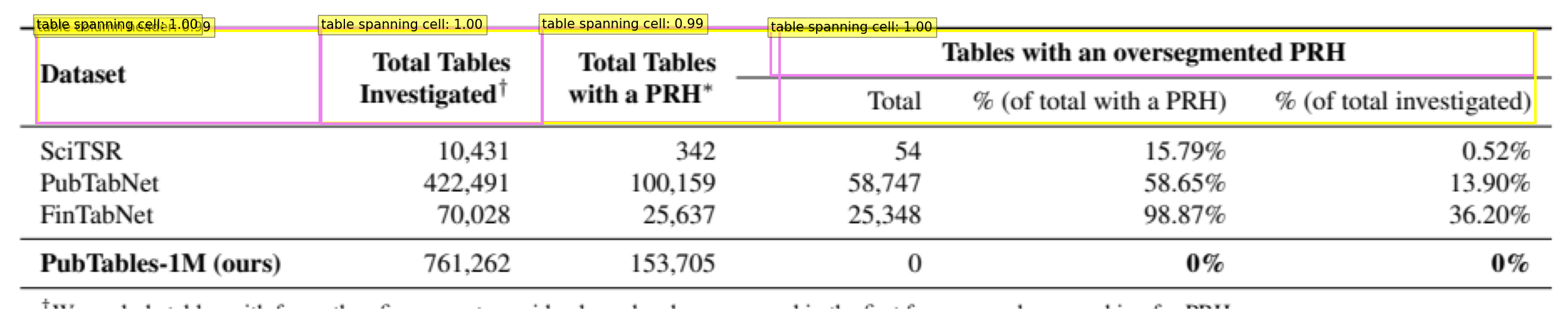
Fig 2. Spanning Hierarchical Top Header
| Dataset | Total Tables \nInvestigated† | Total Tables \nwith a PRH∗ | Tables with an oversegmented PRH \nTotal | Tables with an oversegmented PRH \n% (of total with a PRH) | Tables with an oversegmented PRH \n% (of total investigated) | |
|---|---|---|---|---|---|---|
| 0 | SciTSR | 10,431 | 342 | 54 | 15.79% | 0.52% |
| 1 | PubTabNet | 422,491 | 100,159 | 58,747 | 58.65% | 13.90% |
| 2 | FinTabNet | 70,028 | 25,637 | 25,348 | 98.87% | 36.20% |
| 3 | PubTables-1M (ours) | 761,262 | 153,705 | 0 | 0% | 0% |
Enable Multi Header
A slight misnomer, enable multi header only enforces that the pandas dataframe has multiple headers.
This setting does not need to be enabled for semantic spanning cells (ie. hierarchical top or left headers) to be processed.
If this setting is false, then all the headers are condensed into one header.
Multi-line (and hence hierarchical) information is preserved through \n characters.
| Header 2 | NaN | NaN | NaN | Tables with an oversegmented PRH | Tables with an oversegmented PRH | Tables with an oversegmented PRH |
|---|---|---|---|---|---|---|
| Header 1 | Dataset | Total Tables \nInvestigated† | Total Tables \nwith a PRH∗ | Total | % (of total with a PRH) | % (of total investigated) |
| 0 | SciTSR | 10,431 | 342 | 54 | 15.79% | 0.52% |
| 1 | PubTabNet | 422,491 | 100,159 | 58,747 | 58.65% | 13.90% |
| 2 | FinTabNet | 70,028 | 25,637 | 25,348 | 98.87% | 36.20% |
| 3 | PubTables-1M (ours) | 761,262 | 153,705 | 0 | 0% | 0% |
Large Table Assumption
The large table assumption is a mechanic that improves performance on large tables. Here, algorithmically generated rows are used instead of deep learning.
By default, large table assumption activates under these conditions:
At least one of these:
1. More than large_table_if_n_rows_removed rows are removed (default: >= 8)
2. OR all of the following are true:
Measured overlap of rows exceeds
large_table_row_overlap_threshold(default: 20%)AND the number of rows is greater than
large_table_threshold(default: >= 10)
Large table assumption can be directly turned on/off with config.large_table_assumption = True/False.
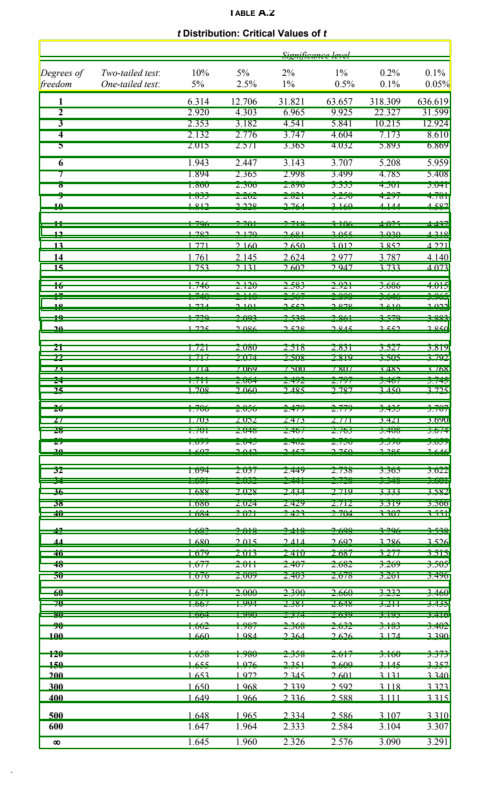
Fig 3. Deep bboxes |
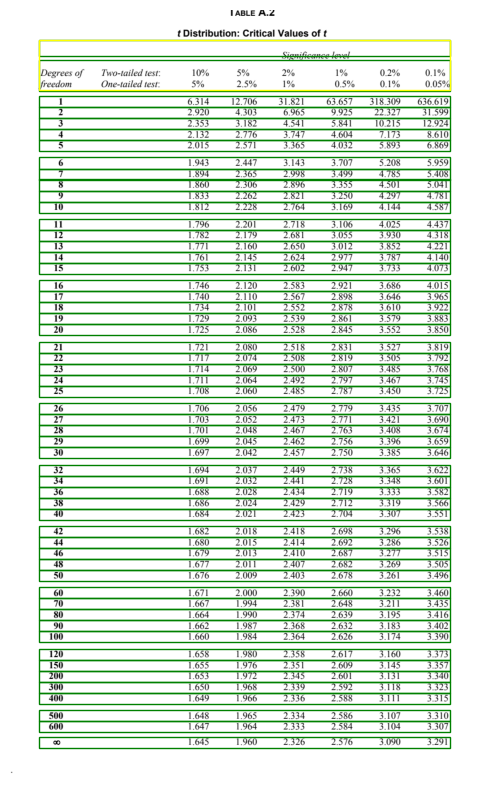
Fig 4. Large Table Assumption on |